

Quick answer: If you are physically in one country but your travel eSIM's public IP geolocates to another, the eSIM is not necessarily malfunctioning. Your phone can connect to a local cell tower and partner mobile network while the internet traffic is routed through a home network, regional gateway, roaming hub, or other core-network exit before reaching the public internet. Websites see that public exit IP, not your GPS location. IP geolocation is also an estimate, especially on mobile, CGNAT, and roaming networks, so different lookup services may even report different countries or cities for the same address.
For example:
Your physical location: Tokyo, Japan
Radio network: Japan
Partner carrier: Japanese mobile network
Public internet gateway: potentially Singapore
IP database result: Singapore
All of those statements can be true at the same time.
Therefore:
My IP says Singapore
does not mean:
My phone is physically in Singapore
and it does not prove:
The eSIM is using a VPN
The key is to separate radio access, roaming-core routing, public IP addresses, and IP geolocation.
The key concepts
| What you see | What it represents | Does it equal physical location? |
|---|---|---|
| GPS | Device-derived location | Usually the closest signal to physical position |
| Carrier name on the phone | Mobile network currently serving the device | No |
| eSIM coverage country | Market where the plan is allowed to work | No |
| Public IP | Internet-facing network address | No |
| IP geolocation | A database estimate for the IP | Not necessarily |
| ASN / ISP | Network organization announcing or managing the route/address | Not necessarily the local retail carrier |
| VPN exit | Public address of a VPN gateway/server | Relevant only when a VPN path is used |
Being in Japan while an IP lookup says Singapore is therefore not a contradiction.
Why doesn't a mobile IP always match your country?
Because connecting to a local radio network and entering the public internet are separate steps.
A simplified path is:
Phone
  ↓
Local cell tower / visited network
  ↓
Mobile core / roaming network
  ↓
Internet gateway
  ↓
Public internet
  ↓
Website
The website normally does not know which individual cell tower served your phone.
What it primarily sees is:
the public IP used when your traffic reaches the internet
If that gateway is associated with another country, an IP database can report that country.
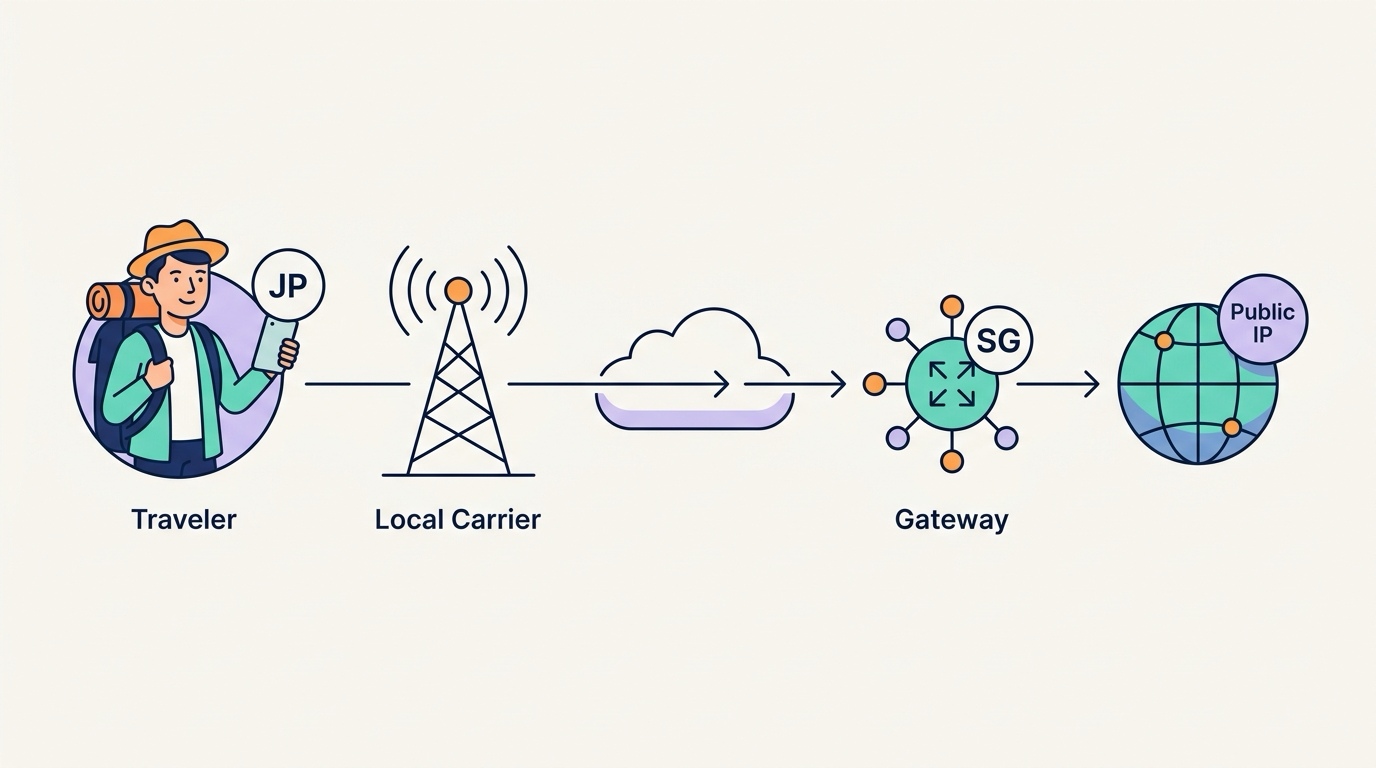
What is home-routed roaming?
GSMA 5G roaming architecture distinguishes between:
- Home Routed (HR).
- Local Breakout (LBO).
With Home Routed roaming, the device is attached to a visited network, but the data session is anchored or handled through the home-network side of the roaming architecture before reaching the data network.
A simplified example:
You are in Japan
  ↓
Japanese partner network
  ↓
International roaming / IPX
  ↓
Home or upstream mobile core
  ↓
Singapore internet gateway
  ↓
Internet
A website may then associate the public IP with Singapore.
That is a routing architecture issue, not a GPS error.
What is local breakout?
With Local Breakout (LBO), roaming data can break out toward the data network from the visited-network side.
A simplified path is:
You are in Japan
  ↓
Japanese partner network
  ↓
Local/visited-network internet gateway
  ↓
Internet
This architecture is more likely to produce a public IP associated with the country you are visiting.
However, even local breakout does not guarantee that every IP geolocation provider will identify the correct city or country because geolocation remains a database estimate.
Why is this especially common with travel eSIMs?
A travel eSIM may rely on more than one party or network layer, such as:
- International roaming agreements.
- Multiple partner carriers.
- Roaming hubs.
- IPX providers.
- Upstream mobile cores.
- Regional internet gateways.
- Cross-border connectivity platforms.
This design is one reason a single eSIM can work across many destinations.
The trade-off is that:
radio-access location
and:
public internet exit location
do not always match.
This is also relevant when comparing regional and global plans:
Local vs Regional vs Global eSIM: Which One Should You Choose?
Does a “Japan eSIM” guarantee a Japanese IP?
No.
A Japan eSIM primarily means:
the product can use supported mobile networks in Japan
It does not automatically mean:
all internet traffic exits through Japan
These are separate product attributes:
Coverage country
≠
Internet breakout country
A product page should only promise a Japan IP when the provider supplies a reliable, product-level commitment that is maintained over time.
Does the local carrier name guarantee a local IP?
No.
Your phone may show a local carrier such as a Japanese, Korean, Singaporean, or Malaysian network.
That tells you which radio/mobile network is serving the device.
It does not directly reveal:
where the internet gateway is located
Roaming traffic can still be carried to another mobile core or international gateway.
Therefore:
Connected to a Japanese carrier
and:
Public IP geolocates to Singapore
can both be true.
How does IP geolocation work?
An IP address does not contain built-in fields for:
latitude
longitude
country
city
Cloudflare currently describes IP geolocation as an estimate and notes that there is nothing inherent that binds an IP address to a physical location or country.
IP geolocation providers may combine signals such as:
- Address allocation.
- ASN data.
- Network-operator information.
- Routing observations.
- Latency.
- First-party or network observations.
- Registration records.
- Historical data.
- Correction requests.
The result can change over time.
Why do two IP-check websites show different countries?
Because different services can use different:
- Geolocation databases.
- Update schedules.
- Inference models.
- Mobile/roaming classifications.
- Correction data.
The same public IP can therefore produce something like:
Service A: Singapore
Service B: Hong Kong
Service C: Japan
Cloudflare explicitly notes that IP geolocation results are not guaranteed to match other providers.
Do not treat one “What is my IP?” website as the equivalent of GPS.
Why is the city often wrong?
Mobile-network addresses can be shared or reused across large geographic areas.
MaxMind notes that mobile IP addresses may be used by devices across a broad area, making city-level or postal-code precision difficult.
For example:
You are in Osaka
IP lookup says Tokyo
can happen even when the country is correctly identified.
This is normal for many mobile networks.
What is CGNAT, and why does it matter?
CGNAT means Carrier-Grade Network Address Translation.
A simplified model is:
Many mobile devices
  ↓
Carrier-private/internal addresses
  ↓
CGNAT
  ↓
A smaller pool of shared public IPs
  ↓
Internet
One public IPv4 address can represent many mobile users.
A public IP is therefore not a personal GPS label.
CGNAT also makes claims such as:
this exact public IP uniquely identifies one phone
unreliable.
Can IPv4 and IPv6 show different locations?
Yes.
A phone can use:
IPv4
IPv6
and different websites may:
- Prefer IPv6.
- Test IPv4 only.
- Use separate geolocation data for each address family.
It is possible to encounter:
IPv4 lookup: Singapore
IPv6 lookup: Japan
Ordinary travelers normally do not need to modify APN or IPv6 settings because of this.
If you are diagnosing the network, first identify which address the lookup service is actually testing.
What are ASN and ISP, and why can the names look unfamiliar?
ASN stands for Autonomous System Number.
It identifies an autonomous routing system on the internet.
An IP lookup may show an ISP or Organization that is not:
Caylet
and not the same brand that appears in the phone's status bar.
The result may instead identify:
- An upstream telecom operator.
- A roaming provider.
- An international network operator.
- A mobile-core provider.
- The organization holding or announcing the address space.
That is not automatically a product problem.
The retail eSIM brand, supply chain, partner carrier, and public-IP ASN can all be different entities.
Does an IP in another country prove that the eSIM uses a VPN?
No.
A VPN can change the public exit IP seen by websites.
But a travel eSIM can also show another country's IP without any VPN because of roaming and gateway routing.
Keep these separate:
Travel eSIM routing
and:
VPN tunneling
For the conceptual difference, read:
eSIM vs VPN: What Is the Difference, and Can an eSIM Replace a VPN?
How can I check whether a VPN is causing it?
If you want to observe the raw mobile-data path, check whether you have enabled:
- A system VPN.
- A corporate VPN.
- A consumer VPN app.
- A security app that creates a VPN profile.
- iCloud Private Relay where applicable.
- A proxy.
- Other network-security tooling.
Private DNS is not the same as a VPN, although some security products bundle multiple functions.
Change one variable at a time during diagnosis.
Can iCloud Private Relay affect the apparent IP location?
Where iCloud Private Relay is available and active for Safari traffic, the network path visible to websites can differ from the normal direct mobile-data path.
If you are trying to diagnose:
the travel eSIM's direct public exit
do not rely on one Safari lookup alone.
You can:
- Check whether Private Relay is enabled.
- Compare another app or network test.
- Compare IPv4 and IPv6.
- Temporarily disable VPN-like tools only for diagnosis.
Do not permanently disable security features you normally need simply to make an IP-check website show a particular country.
Can the wrong IP country affect Google, Netflix, or other services?
It can affect some behavior, but not always.
Services may use IP location for:
- Language or regional defaults.
- Local content.
- Advertising markets.
- Search localization.
- Security analysis.
But many services can also use:
- GPS.
- Account country.
- SIM information.
- Device region.
- Cookies.
- Payment data.
- Other signals.
Therefore:
IP says Singapore
does not mean:
every app will treat you as a Singapore user
Can a different IP country affect banking or credit-card accounts?
There is no universal answer.
Financial platforms may combine:
- IP.
- Device.
- Login history.
- GPS or app location permission.
- SIM/phone data.
- Cookies.
- Account records.
- Transaction behavior.
- Other internal risk signals.
Do not assume:
Local IP = always safe
Foreign IP = always triggers risk controls
Mobile IP = never triggers risk controls
Caylet should not market any eSIM as:
- Bank-friendly IP.
- Anti-risk IP.
- Account-safe IP.
- A way to bypass risk controls.
If a financial or other service requires accurate location, residence, or identity information, follow its terms.
Does a foreign-looking IP mean the service will classify it as a proxy?
No.
IP geolocation and proxy/VPN classification are different datasets.
An address can potentially be classified as:
Country = Singapore
Network type = Mobile
or:
Country = Singapore
Network type = Hosting
and different data providers can disagree on the classification.
Therefore:
wrong country
does not prove:
VPN or proxy
👉 Related Reading: Mobile IP vs Data-Center VPN IP: What Is the Difference?
Can I require an eSIM to have a local IP?
Only when the product explicitly promises that capability.
If your requirement is:
The public IP must geolocate to the destination country
you should look for a provider that explicitly documents:
- Local breakout.
- Local IP.
- Destination-country internet exit.
- A specific routing policy.
If the product page does not say so, do not assume it.
A normal “Japan eSIM” or “Europe eSIM” describes coverage, not necessarily internet-exit geography.
What if Caylet does not show an IP-country field?
Then the correct interpretation is:
Do not guess.
Caylet can accurately display product data such as:
- Coverage.
- Data allowance.
- Validity.
- Partner networks.
- 4G/5G.
- Hotspot support.
- Activation policy.
If the supplier does not provide maintainable internet-breakout information, a fake field such as:
IP Location: Japan
would be less useful than showing the status as unknown.
Should I contact eSIM support because the IP city is wrong?
Usually not.
If:
- Mobile data works.
- Performance is normal.
- Coverage is correct.
- The product did not promise a local IP.
an IP-country or city mismatch is usually not a connectivity fault.
Contact support when
- The product explicitly promises a local IP/routing capability and reality does not match.
- The routing prevents an important supported service from working.
- Latency is abnormally high.
- A routing problem accompanies actual data-connectivity failure.
- You need confirmation of a documented internet-breakout policy.
Can a foreign internet gateway make the connection slower?
It can, but you cannot determine performance from the country label alone.
For example:
Japan
→ Singapore gateway
→ Japanese website
may travel farther than:
Japan
→ Japanese gateway
→ Japanese website
But performance also depends on:
- Peering.
- Congestion.
- Backbone quality.
- DNS.
- CDN placement.
- 4G/5G.
- Signal.
- Throttling.
So:
Foreign IP = slow
is not a valid universal rule.
For actual performance problems, read:
Why Is My eSIM Data So Slow? Complete Speed Troubleshooting Guide
How can I test the travel eSIM's internet exit?
Most travelers do not need advanced network testing.
For diagnosis:
- Turn Wi-Fi off and confirm mobile data is active.
- Confirm the travel eSIM is the selected mobile-data line.
- Temporarily disable the VPN for a controlled test.
- Record the public IPv4 and IPv6 addresses.
- Compare two or three IP-data sources for country and ASN.
- Record the currently connected partner carrier.
- Test latency and throughput.
- Reconnect later and compare again if necessary.
Do not build an absolute conclusion from one screenshot of one IP-check website.
Do not change the APN just because the IP country looks wrong
APN settings primarily control how the mobile-data session is established and configured.
Unless:
- The product provides a specific APN.
- Support tells you to change it.
- Mobile data itself is not working.
do not guess values such as:
internet
data
web
local
Changing a working APN can turn a functioning eSIM into a connectivity problem.
Can manually selecting another partner carrier change the IP?
Possibly, but not reliably.
If a product supports:
Carrier A
Carrier B
the two networks might:
- Use the same upstream mobile core.
- Use different internet gateways.
- Assign different public addresses.
- Follow different routing.
Manual network selection can therefore change the IP, or do nothing.
Do not use carrier selection as a guaranteed “IP-country switching” feature.
Does Airplane Mode give me a new IP?
Sometimes.
Re-establishing the data session may:
- Assign a different IPv4 address.
- Assign a different IPv6 prefix.
- Keep the same internet gateway.
- Use a different shared NAT address.
So the IP may change, or it may not.
Do not promise:
Airplane Mode = guaranteed new IP
and do not repeatedly cycle the radio just to chase a particular geolocation result.
Will restarting the phone fix the IP country?
Not if the underlying issue is simply how an IP-geolocation database labels the network.
A reboot may receive another address, but the new session can still use the same gateway.
Restarting is therefore not a standard “fix the wrong IP country” procedure.
Can the geolocation database update later?
Yes.
Cloudflare notes that IP ownership and allocation can change and geolocation data is updated over time.
Different providers update at different times.
An IP prefix can therefore:
- Be associated with one country today.
- Be changed later.
- Continue to differ across databases.
This is one reason IP geolocation should not be the only signal for high-precision or compliance-critical decisions.
Which IP-check website is the “correct” one?
No provider can guarantee exact physical location for every mobile IP.
First decide what you actually want to know.
Where is the device physically located?
Use:
- GPS.
- Maps.
- Device Location Services.
What country might a website infer from the public IP?
Use:
- Public IP.
- More than one IP geolocation database.
Who operates or announces the network?
Look at:
- ASN.
- ISP/Organization.
Is the network mobile, hosting, VPN, or something else?
That requires network-classification data, and providers may still disagree.
Do not merge these four questions into one.
When is this actually a troubleshooting problem?
Case 1: IP country differs, but data works normally
Usually no action is needed.
Case 2: A website shows the wrong regional experience
Check:
- GPS permissions.
- Account region.
- Cookies.
- VPN/Private Relay.
- The service's own location settings.
Do not assume the eSIM is the only factor.
Case 3: Latency is unusually high
Test:
- Alternative supported partner carriers.
- 4G versus 5G when appropriate.
- VPN off/on for diagnosis.
- Speed and latency at different times.
Case 4: A service requires a destination-country IP
If the eSIM does not promise a local IP, you may need a product or compliant network solution that explicitly supports local breakout or the required internet exit.
Case 5: There is no mobile data at all
That is not merely an IP-geolocation issue.
Read:
eSIM Installed but Not Working? A Complete Troubleshooting Guide
The simple answer for most travelers
If:
Physical location: Japan
IP result: Singapore
Mobile data: working
Speed: normal
and the product did not promise a Japanese local IP:
you usually do not need to fix anything
The phone can still be connected to a real Japanese partner mobile network while the public internet exit and IP database appear elsewhere.
Quick diagnosis table
| Symptom | Likely explanation | Action |
|---|---|---|
| In Japan, IP says Singapore, data works | Home routing / regional gateway / geolocation | Usually none |
| Country correct, city wrong | Mobile-IP geolocation precision | Usually none |
| Different lookup sites show different countries | Database differences | Usually none |
| VPN changes IP to another country | VPN exit | Normal if expected |
| VPN off, IP still shows another country | eSIM/roaming routing | May be normal |
| Foreign IP plus very high latency | Routing may affect performance | Troubleshoot |
| Plan promises local IP but does not deliver | Product capability issue | Contact support |
| No data at all | Not just geolocation | Follow connectivity troubleshooting |
Frequently asked questions
Why am I in Japan while my eSIM IP says Singapore?
The phone can connect through a Japanese partner network while the traffic is carried through a mobile core or internet gateway in Singapore.
Does that mean the eSIM is using a VPN?
No. Home-routed roaming or regional gateway routing can produce a different IP country without a VPN.
Is the eSIM broken if the IP country is wrong?
Usually not. If mobile data, coverage, and performance are normal, an IP-location mismatch alone is not a fault.
Does a Japan eSIM always have a Japan IP?
No. Coverage country and internet-breakout country are separate attributes.
Why do two IP websites show different countries?
They can use different geolocation databases, models, and update schedules.
Why is the IP city inaccurate?
Mobile addresses can be shared and rotated across broad regions. CGNAT further reduces the connection between a public IP and one physical device.
Will Airplane Mode give me a local IP?
No guarantee. It may assign a different address while keeping the same internet gateway.
Can manual carrier selection change the IP country?
Possibly, but it is not guaranteed. Multiple partner carriers can still share the same upstream routing.
Can a VPN “fix” the eSIM's IP country?
A VPN can make websites see the VPN exit IP, but that adds another routing layer; it does not convert the eSIM's original internet breakout into a local one.
Can a different IP country affect my bank?
You cannot predict that from the IP country alone. Financial platforms can use many signals, and no eSIM or IP type guarantees the result of a risk-control system.
Can a foreign gateway make the eSIM slower?
It can increase routing distance, but actual performance depends on the entire network path, peering, congestion, signal, and server location.
Official and technical references
- GSMA: 5GS Roaming Guidelines
- GSMA: IMS Roaming, Interconnection and Interworking Guidelines
- Cloudflare: IP Geolocation — Accuracy and limitations
- MaxMind: Geolocation Accuracy
Any Caylet claim about internet breakout, ASN, IP classification, or local-IP behavior should only be shown when reliable product-level supplier data exists. When the data is unavailable, the correct state is unknown rather than an inference from destination or partner carrier.
Summary
If you are in one country but the eSIM's IP appears in another, the most common explanation is not:
The eSIM is broken
The phone is physically in the wrong country
It must be using a VPN
It is more likely a combination of:
local radio access
+
roaming/core-network routing
+
an internet gateway elsewhere
+
an IP-geolocation database estimate
Remember four rules:
- Coverage country ≠ IP country
- Partner carrier ≠ internet-breakout country
- IP geolocation ≠ GPS
- Foreign-looking IP ≠ VPN
If the connection works and the product does not promise a local IP, do not change APN settings, delete the eSIM, or repeatedly reinstall it just because an IP-check website shows another country.


