

Quick answer: If losing internet for 30 minutes would only delay a map lookup, a dedicated backup may not matter. If you are traveling for Zoom or Teams calls, remote desktop, client work, corporate systems, urgent uploads, or time-sensitive itinerary changes, relying on one network path creates an unnecessary single point of failure. A useful backup is not merely another Wi-Fi password: it should ideally avoid the same failure domain as the primary connection. A practical setup is primary mobile data + a second connection with different failure characteristics + adequate power. For example, use a travel eSIM as the primary mobile path, hotel or office Wi-Fi for high-volume work, and keep home-carrier roaming or another independent mobile network available for emergencies.
The difference between leisure travel and business travel is not necessarily how many gigabytes you use.
A better question is:
What is the cost of being offline for 30 minutes?
On a leisure trip, you may be able to:
- Upload photos later.
- Use an offline map.
- Wait until you return to the hotel.
During a business trip, you may be:
- Joining a client meeting.
- Running remote desktop.
- Uploading a deliverable.
- Connecting through a corporate VPN.
- Responding to an urgent customer.
- Rebooking a disrupted flight.
- Accessing a work dashboard.
A connectivity outage can therefore become a business interruption.
The value of a backup connection is not simply “more data.”
It is:
reducing a single point of failure
The resilience principle: do not let primary and backup share the same failure
NIST's contingency-planning guidance for telecommunications explicitly discusses alternate telecommunications services and reducing the likelihood that the alternate service shares a single point of failure with the primary service. Higher-assurance guidance also calls for alternate providers to be separated from primary providers so they are not exposed to the same hazards.
That document is written for organizational information systems, not individual travelers, but the resilience principle translates cleanly:
If the primary and backup fail for the same reason,
the backup is not very independent.
What is a failure domain?
A failure domain is a set of components that can fail together.
A hotel Wi-Fi path can depend on:
- The hotel's access points.
- The hotel's router.
- Its upstream ISP.
- Captive portal.
- Building power.
- Coverage in your room.
A travel eSIM path can depend on:
- Your phone.
- The eSIM profile.
- Remaining data.
- The local partner carrier.
- Cell sites.
- Roaming core.
- Supplier upstream.
- Battery power.
So the useful question is not:
How many connection methods do I have?
It is:
Will they fail together?
Common business-travel single points of failure
Relying only on hotel Wi-Fi
Possible problems include:
- Venue outage.
- Heavy evening congestion.
- Weak room coverage.
- Captive-portal failure.
- Device-count restrictions.
- No access after checkout.
If a meeting must start at a fixed time, hotel Wi-Fi should not be your only possible path.
Relying only on one travel eSIM
A travel eSIM is convenient, but it can still be affected by:
- A partner-network outage.
- Local congestion.
- Exhausted data allowance.
- Activation problems.
- Roaming-core issues.
- Device failure.
- Battery depletion.
“Primary mobile network” and “only mobile network” are different concepts.
Two eSIMs that use the same underlying network
This is easy to overlook.
Imagine:
eSIM A → Carrier X
eSIM B → Carrier X
or two brands that ultimately rely on:
the same upstream supplier
the same roaming core
the same internet gateway
They are two orders, but they may not provide strong underlying independence.
Therefore:
Two eSIMs ≠ automatically two independent networks
Treating phone hotspot as a second network
With:
iPhone Travel eSIM
→ Personal Hotspot
→ MacBook
the laptop and phone still depend on the same upstream mobile connection.
If the eSIM loses data:
the phone loses internet
+
the laptop hotspot loses internet
Hotspot is a sharing mechanism, not an independent upstream path.
Putting every backup on the same phone
Even with:
eSIM A
eSIM B
both can disappear if the phone is:
- Out of battery.
- Lost.
- Damaged.
- Overheated.
- Experiencing a system failure.
That is a device-level single point of failure.
What does a better backup look like?
There is no universal setup.
Think in terms of independence.
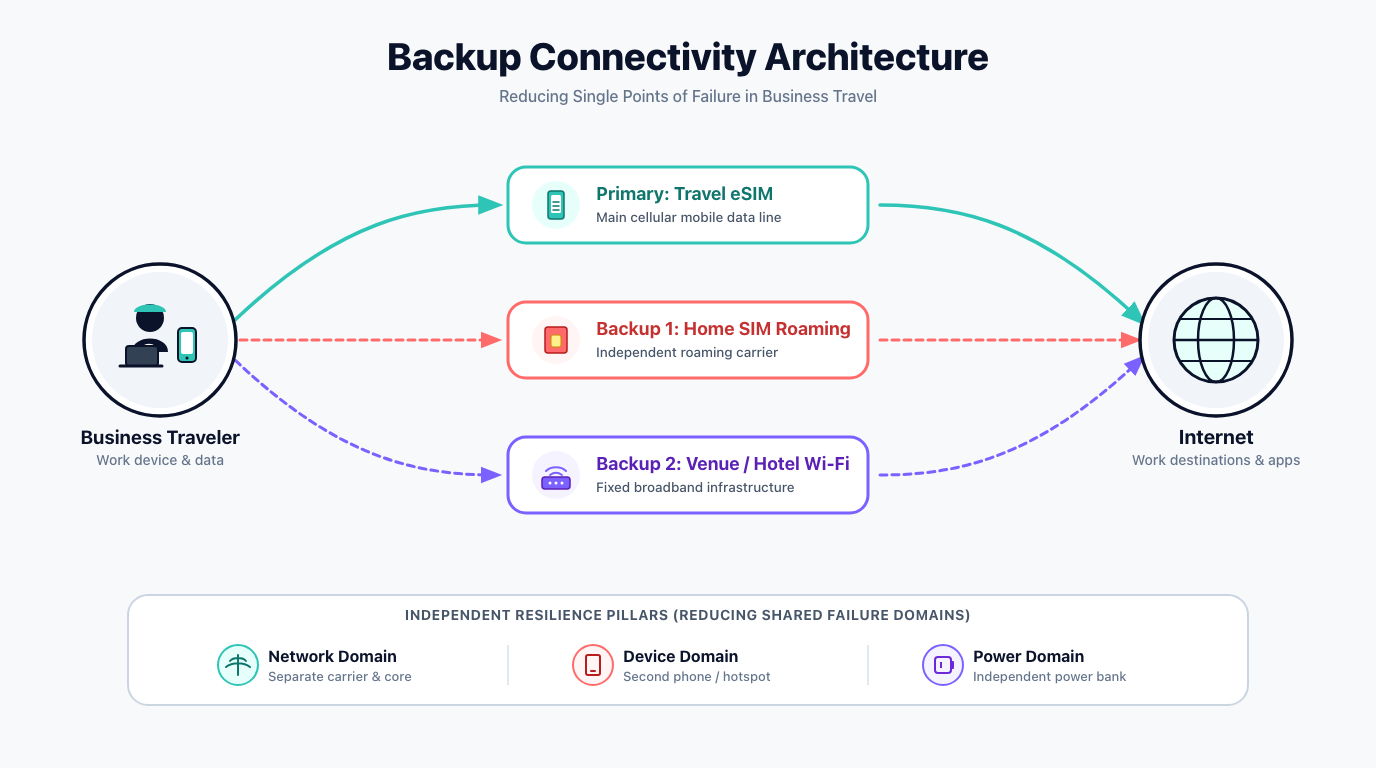
Option 1: Travel eSIM + hotel or office Wi-Fi
Primary:
Travel eSIM

Secondary:
Hotel / Office Wi-Fi
This is the easiest two-path strategy.
Advantages:
- Cellular and fixed/venue Wi-Fi normally use different access technologies.
- Wi-Fi is useful for large transfers.
- You can switch to mobile data if venue Wi-Fi fails.
- You can try Wi-Fi if the mobile network is congested.
Limitations:
- Venue Wi-Fi works only where it is available.
- The two paths can still share some upstream infrastructure.
- You do not control venue capacity or maintenance.
For many business travelers, this is already much more resilient than “hotel Wi-Fi only.”
Option 2: Travel eSIM + home-carrier roaming
Primary:
Travel eSIM

Backup:
Home SIM roaming
This is a very practical arrangement.
During normal use:
Travel eSIM → Data
Home SIM → Calls / SMS
If the primary data path fails, you can switch to the home carrier when necessary.
Advantages:
- No extra hardware.
- The home line may already remain active.
- Dual SIM phones can switch the data line quickly.
- The home carrier and travel eSIM may use different partner networks.
Before relying on it, check:
- Roaming prices.
- Destination support.
- Roaming partner networks.
- Whether the two paths are actually independent.
Do not discover an expensive pay-as-you-go rate during an emergency video call.
Option 3: Two eSIMs on different networks
On a phone that supports two active eSIMs, you can use:
eSIM A:
Primary

eSIM B:
Backup
Apple's current Dual SIM support allows travelers to add a data plan and select which line is used for cellular data. Google Pixel similarly lets users choose separate SIM preferences for data, calls, and texts.
The real question is:
Do A and B have different failure domains?
Useful independence may come from:
- Different partner carriers.
- Different upstream providers.
- Different roaming cores.
- Different coverage strategies.
Consumers may not always have access to all of that supply-chain information.
When it is unavailable, using plans with clearly different supported mobile networks is a more defensible starting point than assuming that different branding equals different infrastructure.
Option 4: Travel eSIM + Pocket Wi-Fi
Phone:
Travel eSIM

Laptop / backup:
Pocket Wi-Fi
If the Pocket Wi-Fi uses an independent mobile network, this can provide both:
network redundancy
+
device redundancy
A phone that fails or runs out of battery would not necessarily disconnect the laptop.
Trade-offs include:
- Extra hardware.
- Charging.
- Rental or purchase cost.
- Possible overlap in underlying partner carrier.
- Multi-country coverage requirements.
For a broader comparison:
eSIM vs Pocket Wi-Fi vs Public Wi-Fi: Which Is Best for Travel?
Option 5: A second phone
For people whose work depends heavily on mobile connectivity:
Primary phone:
Travel eSIM A

Secondary phone:
SIM/eSIM B
can add:
network redundancy
+
device redundancy
That is not necessary for every business traveler.
If the trip involves occasional email only, carrying a dedicated second phone may be excessive.
Which layers should be independent?
You can evaluate six layers.
| Layer | Primary path | Better backup characteristic |
|---|---|---|
| Device | Main phone | Another usable device where justified |
| Access | 5G/LTE | Wi-Fi or another mobile line |
| Partner carrier | Carrier A | Carrier B |
| Upstream/core | Provider A | Different upstream where possible |
| Internet gateway | Gateway A | Different exit path improves diversity |
| Power | Phone battery | Charger/power bank |
You do not need complete independence at every layer.
But the more critical layers that share:
one failure point
the weaker the redundancy.
Are two different eSIM brands automatically redundant?
No.
You can have:
Brand A
  ↓
Supplier X
  ↓
Carrier Y

Brand B
  ↓
Supplier X
  ↓
Carrier Y
The storefront branding differs while the underlying path overlaps heavily.
The reverse can also be true: two plans may genuinely use different infrastructure.
Caylet should therefore not claim:
Buy any second eSIM and you have carrier redundancy
unless the underlying network data supports that statement.
What if one eSIM supports several partner carriers?
That provides useful but incomplete redundancy.
For example:
Carrier A
Carrier B
can help when one radio network has weak coverage or a localized outage.
That creates some:
radio/access-network diversity
but both networks can still share:
- One eSIM profile.
- One supplier.
- One roaming core.
- One plan balance.
- One phone.
It is partial redundancy, not a fully independent stack.
Automatic or manual network selection?
For normal use, start with:
Automatic network selection
If the primary partner has problems and the product explicitly supports another carrier, manual selection can be a troubleshooting option.
Do not permanently lock to one partner merely because it appears more technical or professional.
Can Dual SIM switch data automatically?
Some devices offer data-switching features.
Apple Dual SIM includes:
Allow Cellular Data Switching
and supported Pixel configurations can offer:
Automatic data switching
These features can improve continuity, but the billing consequence matters.
If the backup line is expensive international roaming:
automatic failover
may create unexpected charges.
Business travelers should decide whether they prefer:
automatic failover
or
manual failover
before the trip.
What is manual failover?
A simple manual process is:
Primary fails
↓
Open SIM settings
↓
Choose backup SIM for mobile data
Advantages:
- Better billing control.
- You know when the backup is being used.
- Expensive roaming is less likely to activate unnoticed.
Disadvantages:
- Requires manual action.
- Less graceful during an active meeting.
- You need to know the setting location in advance.
What is automatic failover?
Automatic data switching lets the device or network attempt another path under certain conditions.
Advantages:
- Potentially faster recovery.
- Less user intervention.
Limitations:
- Device/carrier dependent.
- Can generate charges.
- Not every failure is detected correctly.
- It still cannot help if both lines share the same underlying failure.
Do not treat consumer Dual SIM switching as enterprise SD-WAN.
Most business-travel failures are smaller than a nationwide outage
Common disruptions are often local:
- Weak hotel-room Wi-Fi.
- A crowded conference network.
- Congestion on one partner carrier.
- High-speed data depleted.
- Tethering restricted.
- Phone battery depleted.
- VPN configuration issue.
- Captive portal expired.
- DNS or a particular service experiencing problems.
The advantage of a backup path is that you can:
restore work first
and diagnose the root cause later
What should you test before an important video call?
Do not wait until the meeting begins.
Before a critical session:
- Test the primary internet connection.
- Test the backup connection.
- Confirm Zoom/Teams authentication.
- Test the corporate VPN.
- Test phone hotspot.
- Make sure the laptop has joined the backup network before.
- Check remaining eSIM data.
- Charge the phone and laptop.
- Charge the power bank.
- Pause unnecessary high-volume background sync.
For a very important meeting, doing a short pre-flight check is much more useful than learning your SIM menu during an outage.
How much data does a video meeting need?
There is no single number that applies to every meeting platform and configuration.
Usage varies with:
- 720p versus 1080p.
- Camera on/off.
- Multi-person video.
- Screen sharing.
- Codec.
- Adaptive quality.
- Platform.
For plan sizing, use:
How Long Do 1GB, 3GB, 5GB, and 10GB eSIM Plans Last?
Do not size an emergency plan to the exact theoretical minimum. Leave some margin.
Is phone hotspot a good laptop backup?
Yes, when the plan supports tethering.
Confirm:
- Hotspot is allowed.
- Sufficient data remains.
- The phone has enough power.
- Thermal conditions are reasonable.
- Large laptop updates are controlled.
Apple currently describes Personal Hotspot as using the iPhone's cellular connection to create a portable Wi-Fi connection. Google Android likewise supports sharing mobile data by Wi-Fi, Bluetooth, or USB on many devices, while noting that carriers can limit or charge for tethering.
Feature guide:
Can a Travel eSIM Use Hotspot, Calls, and SMS?
Power is part of network redundancy
A traveler can prepare:
two SIMs
and still lose both because the phone is dead.
For extended mobile work, consider:
- A reliable charger.
- Power bank.
- Correct USB-C cables.
- Whether the laptop can charge the phone.
- Whether the Pocket Wi-Fi needs a separate cable.
Availability is a combination of:
Network
+
Device
+
Power
Can public Wi-Fi be a backup?
Yes, but it is better thought of as:
secondary or tertiary connectivity
rather than the only mission-critical path.
There are two main issues.
Availability
You do not control:
- Whether Wi-Fi is available.
- Congestion.
- Captive portal.
- Room coverage.
- Outages.
Security and company policy
CISA advises travelers to be cautious with public wireless networks. Your employer may also require a corporate VPN or other controls on public networks.
If your organization requires:
- Corporate VPN.
- MDM.
- Zero Trust access.
- Endpoint security.
follow that policy.
Do not disable company security controls because a travel guide suggests a different network.
If the corporate VPN fails, will a second eSIM help?
Sometimes, but not always.
If:
Internet works
Corporate VPN service is down
another eSIM may not fix the problem.
The failure domain is:
corporate VPN / company infrastructure
not the travel access network.
Separate:
access failure
from:
application/service failure
If two independent internet paths work but the corporate VPN fails on both, contact IT rather than buying a third eSIM.
How can you tell whether the access network or company service is failing?
Run a minimal test:
- Can normal HTTPS websites load?
- Does DNS work?
- Can the corporate VPN connect?
- Is only one SaaS application failing?
- Does the same service work over the backup connection?
If:
Primary internet fails
Backup internet works
the access path is a likely suspect.
If:
Primary works for normal web
Backup works for normal web
Corporate VPN fails on both
the VPN or corporate side is more likely.
Do not confuse eSIM and VPN roles
A common business path is:
Travel eSIM
→ Internet
→ Corporate VPN
→ Company systems
The travel eSIM supplies:
connectivity
The VPN supplies:
a corporate/private network path
For the distinction:
eSIM vs VPN: What Is the Difference, and Can an eSIM Replace a VPN?
Should you install a backup eSIM before departure?
It depends on the activation rules.
If a plan explicitly allows:
- Early installation.
- Installation without starting validity.
- Activation only on destination network.
preparing it in advance can reduce friction.
But products differ in how:
install
activate
validity start
interact.
Do not activate a backup plan days early if doing so starts the validity clock unnecessarily.
How much data should a backup plan have?
A backup does not need to match the primary plan.
Size it around:
minimum critical work capability
For example, if the backup only needs to support:
- Email.
- Slack.
- Ride-hailing.
- Flight changes.
- One emergency call.
a relatively small plan may be enough.
If the backup must support:
- Hours of video meetings.
- Large cloud transfers.
- Video uploads.
- Multi-device tethering.
you need more capacity.
The useful question is:
What must continue working during a primary outage?
not:
Does the backup have the same GB as the primary?
Does an unlimited plan eliminate the need for backup?
No.
“Unlimited” addresses:
data allowance
not:
network availability
An unlimited plan can still be affected by:
- Carrier outage.
- Cell congestion.
- Device battery.
- Profile problems.
- VPN failure.
Therefore:
Unlimited ≠ redundancy
Does 5G eliminate the need for backup?
No.
5G describes:
radio-access technology
not:
an availability guarantee
One very fast 5G path is still one path.
Business continuity asks:
Can I keep working if this path fails?
Does the backup eSIM have to remain active?
Not necessarily.
There are three broad strategies.
Cold standby
The backup is purchased or available but not active.
Advantages:
- Preserve validity.
- No normal data use.
Disadvantages:
- Installation or activation may still be needed during the incident.
Warm standby
The backup profile is installed and ready to enable, but is not the normal data line.
Advantages:
- Fast manual switching.
- Can potentially be tested in advance.
Disadvantages:
- Some products may already have started validity.
Hot standby
Both lines remain ready, and the device can switch rapidly or automatically where supported.
Advantages:
- Fastest recovery.
Disadvantages:
- Higher cost potential.
- Device/carrier constraints.
- Possible roaming charges.
Do not treat all standby strategies as the same.
Which setup fits different business-criticality levels?
Low criticality
Travel eSIM
+
Hotel Wi-Fi
is often enough.
Medium criticality
Travel eSIM
+
Hotel Wi-Fi
+
Home roaming available on demand
High criticality
Primary mobile network
+
Independent backup mobile network
+
Trusted Wi-Fi
+
Power backup
If device redundancy is also required, add a Pocket Wi-Fi device or second phone.
A practical three-layer business-travel setup
Layer 1 — Primary
Travel eSIM
For normal:
- Maps.
- Email.
- Messaging.
- Work apps.
- Laptop tethering.
Layer 2 — High-volume / Secondary
Hotel / Office Wi-Fi
For:
- Large files.
- Cloud sync.
- OS updates.
- Longer calls.
Layer 3 — Emergency backup
Home roaming
or
Second independent eSIM
or
Independent Pocket Wi-Fi
used only when:
Primary fails
This is closer to continuity planning than simply buying the largest data package.
Business travel redundancy checklist
Before departure
- Primary eSIM selected.
- Primary partner networks understood.
- Backup path prepared.
- Checked whether primary and backup may use the same carrier.
- Home-carrier roaming prices understood.
- Dual SIM capability confirmed.
- Personal Hotspot tested.
- Corporate VPN tested.
- Activation/validity rules checked.
- Necessary offline maps downloaded.
- Power bank packed.
- Correct charging cables packed.
After arrival
- Primary eSIM works.
- Current partner carrier noted.
- Backup path tested at least once.
- Hotel/office Wi-Fi tested.
- Corporate VPN tested.
- Remaining primary data checked.
Before an important meeting
- Phone charged.
- Laptop charged.
- Primary connection tested.
- Backup tested.
- VPN tested.
- Large background downloads paused.
- Charger/power bank available.
- Know how to switch the data SIM manually.
Quick decision table
| Business requirement | Minimum setup to consider |
|---|---|
| Occasional email | Travel eSIM + venue Wi-Fi |
| Daily video meetings | Travel eSIM + venue Wi-Fi + available backup |
| Home-number SMS required | Home SIM + travel eSIM |
| Important remote work | Primary mobile + independent backup |
| Several laptops/tablets | eSIM hotspot or Pocket Wi-Fi |
| Frequent multi-country travel | Regional/global eSIM + backup path |
| Corporate VPN must remain reachable | At least two internet paths, while company VPN also needs its own resilience |
| Cannot tolerate a 30-minute outage | Avoid relying on one carrier, one device, and one power source |
Frequently asked questions
Does every business traveler need two eSIMs?
No. The goal is a second usable path with reasonably independent failure characteristics. It can be home roaming, venue Wi-Fi, a second eSIM, or Pocket Wi-Fi.
Can hotel Wi-Fi be the backup?
Yes. It is a useful second path, although it is location-dependent and performance is not guaranteed.
Are two different eSIM brands automatically independent?
No. They may use the same partner carrier, supplier, or core network.
Does one eSIM with two partner carriers count as redundancy?
It provides partial redundancy against some radio-network problems, but the profile, supplier, plan, phone, and potentially the core network remain shared.
Is phone hotspot a second network?
Not if it is sharing the same primary eSIM. It is a different way to connect the laptop to the same upstream network.
Does an unlimited eSIM remove the need for backup?
No. Unlimited data does not protect against carrier, device, power, or core-network failures.
Is 5G more important than having a backup?
They solve different problems. 5G can improve performance, while a backup reduces dependence on one path.
Should I activate a backup eSIM before travel?
Check the plan. If activation starts validity immediately, activating too early may waste the plan. If early installation is supported without starting validity, preparation can be useful.
Does the backup need as much data as the primary?
No. Size it for the minimum critical work that needs to continue during an outage.
Can two SIMs switch automatically?
Some iPhone and Pixel configurations support data-switching features, but behavior and cost depend on device and carrier. Expensive roaming backups may be better as manual failover.
If the corporate VPN fails, should I switch eSIMs?
First test normal internet access. If the VPN fails on two working internet connections, the company VPN or service is a more likely failure domain.
Official and technical references
- NIST SP 800-34 Rev. 1: Contingency Planning Guide for Federal Information Systems
- Apple: Use Dual SIM on iPhone
- Apple: Connect to Personal Hotspot on iPhone or iPad
- Google Pixel: How to use dual SIMs on your Pixel phone
- Google Android: Share a mobile connection by hotspot or tethering
- CISA: Cybersecurity While Traveling
NIST SP 800-34 is written for information-system contingency planning. This guide borrows the general resilience principle of reducing shared single points of failure between primary and alternate telecommunications paths; it does not imply that individual travelers must implement federal information-system controls.
Actual Caylet partner networks, hotspot support, activation rules, validity, and routing capabilities should come from current product and order data.
Summary
The most important question in business-travel backup design is not:
Did I buy two SIMs?
It is:
If the primary path fails,
can the alternate path actually keep working?
Remember six principles:
- Backup ≠ more data.
- Two eSIM brands ≠ two independent networks.
- Hotspot ≠ an independent upstream.
- Unlimited ≠ redundancy.
- Network redundancy without power redundancy is incomplete.
- The strongest backup avoids the same failure domain as the primary path.
For many business travelers, a practical starting point is:
Travel eSIM as primary mobile connectivity
+
hotel/office Wi-Fi as a secondary path
+
home roaming or another independent mobile network for emergencies
+
a power bank
👉 Related Reading: What Is a Business eSIM? A Mobile Connectivity Guide for Cross-Border Workers


